I am learning that each browser is more different than I expected. I was hoping to use Google Chrome as my primary development browser for this project since it is my primary day-to-day browser. I don’t trust Safari and I haven’t used Firefox in years (I actually thought it had been discontinued). I have been working through various p5.js and p5.sound tutorials since my last post and have run into a very troubling bug that hampers functionality on Chrome.
I had chosen to work on p5.js as it is the most appealing JavaScript library to newcomers that is useful to me at this point. I was really excited to learn about all the different objects and functionality it brings, especially since p5.js will be very useful to visualize audio concepts as well.
Yesterday I was testing the pause() function on a tester website I was hosting locally with Node.js on Chrome and ran into problems. p5.SoundFile is a custom p5 object that the library seems to be built around to control playback of sound files on the browser. play() and pause() are both methods of p5.SoundFile and do exactly what their titles suggest on any uploaded sound source. By toggling between play() and pause() the user should expect to hear their song pause then resume from where it left off instead of starting over from the beginning each time. Well, that’s how it goes on Firefox and Safari. As far as I can tell, stop() and pause() have the same functionality on Google Chrome.
The other problem I have come across regarding the p5.SoundFile is an error message popping up in the developer console on the browser whenever SoundFile is referenced via play() or pause(). This can be observed even on p5.sound’s own documentation page. By going to this link:
https://p5js.org/reference/#/p5.SoundFile
and opening the developer console (CMD + OPTION + J on Chrome, CMD + OPTION + I on Firefox) you can observe one of the two following error messages if you click on the example play box:
“Uncaught TypeError: Cannot read property ‘length’ of undefined” or “TypeError: arraySequence[0] is undefined”.
So I am guessing at this point that p5.js is sending an array of information to the browser before it has time load fully. The first cell in the array is being referenced by the browser before it can even get a 0 in there. This issue seems to be less than a year old after looking on various coding forums. Maybe with some help I’ll be able to navigate around this issue. I really like p5.js, and probably will use the graphics capabilities it provides in the final product no matter what so I would much prefer to use it as my primary audio library as well. Tone.js is a very well-documented JavaScript audio library as well so I am eying that as a potential option. I will make a decision after the weekend.
In other, more productive news, the Max MSP prototype patchers are much more organized now. Using [panel] and [tab] is a nice way to create large, easy to understand interfaces.
Here is the amplitude modulation patcher now:

Here is a simple forwards/backwards tool:

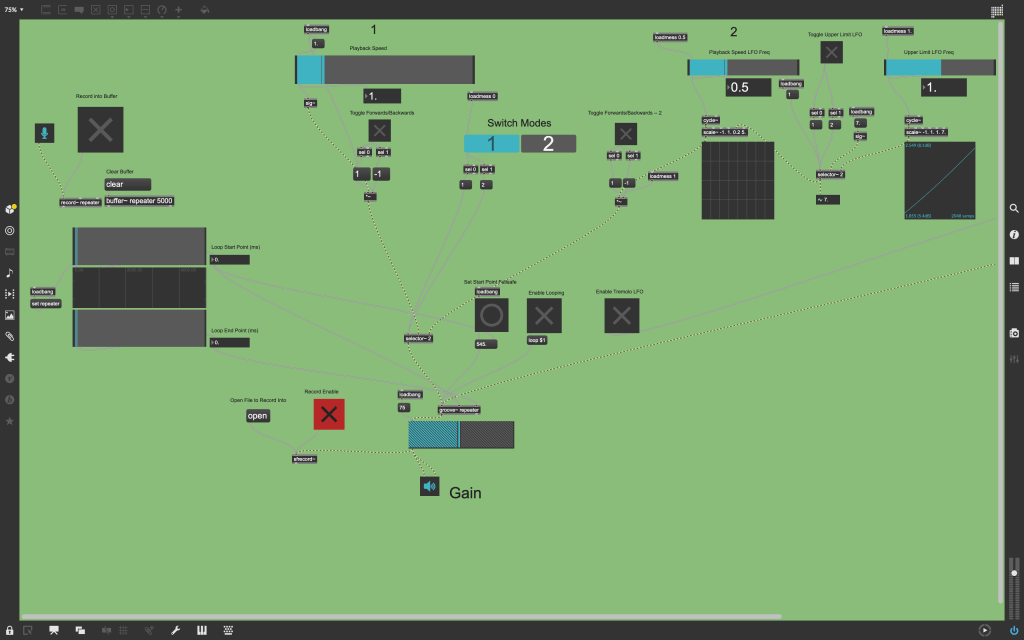
Here is the most advanced one, which doesn’t have a good title because it’s more of a combination of the two above concepts. Also this was the first patcher I cleaned up, so is more cluttered than the above two as well. I will take a second pass at it this coming week:
 Chris Duvall
Leave a comment